Showing posts with label ABAP. Show all posts

Accessing SAP with Python

Python is an Open Source, powerfull and easy to learn programming language. From simple applications to projects like
built modern web apps for SAP


http://zachis.it/blog/what-are-the-advantages-of-python/

This Example was done via the IPython interactive notebook, which provides a rich architecture for interactive computing.

How to quickly generate PDFs from SAP outputs

Every time we generate an Output, a Bill of Lading, Invoice output or Order Confirmation as examples, the System generates a Spool Request, which can be consulted in transaction SP01.

Sometimes it is necessary to generate a PDF version of a particular output. One way of doing this is to use standard program RSTXPDFT4. Select the Spool Request ID and execute the program.


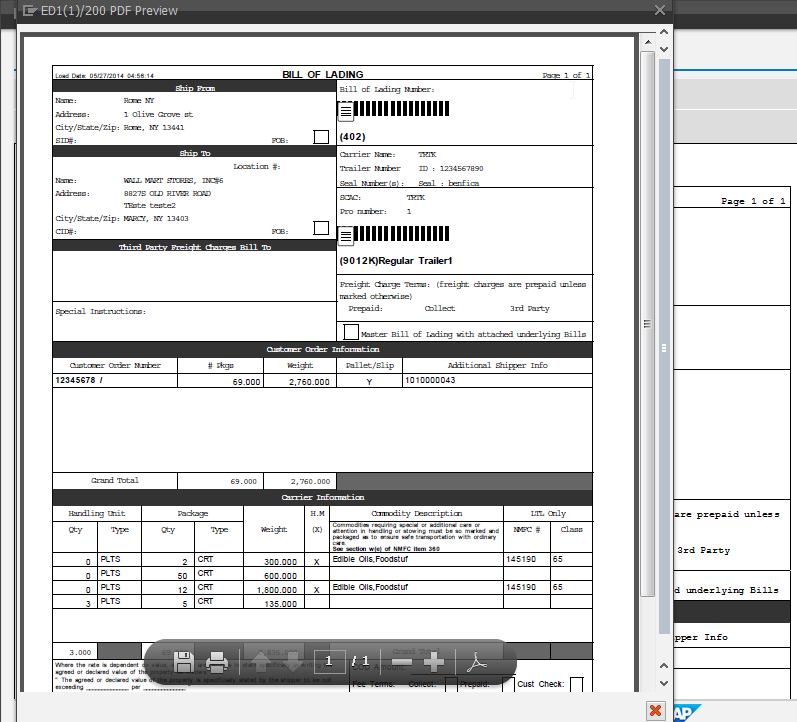
But there is a much quicker way of generating a PDF from an output. Bellow is an example using an Outbound Delivery ( VL02n ) Bill of Lading output.


Go to you transaction, in this case VL02n, and issue an output with print preview.


Then write PDF! and a new window will open with the PDF file. You will be able to save it to you computer.


Note: This can also be done in the SMARTFORMS transaction to send a particular layout to PDF.


Add Generic Object Services - GOS to Sales Order

If the Generic Object Services - GOS button is missing from the sales Order Transaction. User Parameter SD_SWU_ACTIVE must be set to X. 

This user parameter is not set by default due to performance issues.

Parameter for activating Generic Object Services in the Sales ORder

ABAP Refactoring - Local Class to Global Class


In abap it is possible to create both local classes, defined within an ABAP program, or create them in the repository, via the ABAP Class Builder ( SE24 or SE80). The difference being that the global class can be used in several reports, and the local class can only be used within the ABAP program it was created in.

Then, if you are creating program specific logic, you can use the a local class. One example of local classes are the one used to Unit Test a program, or function module, or local class. 
Note that with global classes you should use the ABAP UNIT TEST framework, which is another reason that makes working with global classes so compelling.

But sometimes we realize that a class created a a local class would be useful on another context, thus we should change the class from local to global, so that it can be used in that new context. fortunately the ABAP Class builder provides a very useful re-factoring tool to convert a local class to a global one.

This is how to do it.

  • SE24->Object type->Import->Local Classes in program


  • Select the program and class to be converted to the ABAP repository, and press the import button.


  • The class is created in the ABAP repository, and now the programs should be changed to use this instead of the old local class. 


Note: This method does not delete the old local class, only creates a duplicate in the ABAP repository. It is a good practice to remove the local class from the program because it will be no longer used.

How to find a SAP Enhancement when we know the Exit function module

Here is an easy way to find the correct SAP enhacement where a particular exit function module is when you know the function module name.

The exemple below is for EXIT FM EXIT_SAPLVEDA_011 found in the IDOC inblund Sales Order creation function module 'IDOC_INPUT_ORDERS'.

How to simulate a User Input in the command field - User Comand

There are many situations where it is usefull to force a user command programatically. One of such cases is when we want to update the selection screen after a screen field has changed.

To do so one only has to call the following Function module: SAPGUI_SET_FUNCTIONCODE .


  CALL FUNCTION 'SAPGUI_SET_FUNCTIONCODE'
    EXPORTING
      functioncode           = '=ENT'
    EXCEPTIONS
      function_not_supported = 1
      OTHERS                 = 2.
In the exemple above, we are forcing an ENTER.


Here is a practical example on filling two display fields on the selection screen, after the user changes the plant.


When the User changes the Plant the List of Warehouses and Storage Locations Changes Automatically


Code:

AT SELECTION-SCREEN ON VALUE-REQUEST FOR p_werks .
  PERFORM get_plants USING p_werks.


AT SELECTION-SCREEN OUTPUT.
  PERFORM fill_screen_texts USING     p_werks
                            CHANGING  p_lgort
                                      p_lgnum.

  LOOP AT SCREEN.
    CASE screen-group1.
      WHEN 'DIS'.
        screen-input  = '0'.
    ENDCASE.
    MODIFY SCREEN.
  ENDLOOP.


*&---------------------------------------------------------------------*
*&      Form  GET_PLANTS
*&---------------------------------------------------------------------*
*       text
*----------------------------------------------------------------------*
*      -->P_P_WERKS  text
*----------------------------------------------------------------------*
FORM get_plants  USING    p_p_werks.

  TYPES: BEGIN OF ty_s_werks,
    werks TYPE werks_d,
    name1 TYPE name1,
    END OF ty_s_werks.

  DATA: lt_werks            TYPE TABLE OF ty_s_werks.


  SELECT DISTINCT werks name1 FROM t001w
    INTO TABLE lt_werks
    WHERE werks IN ( SELECT DISTINCT werks FROM zmdm_crwh ).


  CALL FUNCTION 'F4IF_INT_TABLE_VALUE_REQUEST'
    EXPORTING
      retfield        = 'WERKS'
      dynpprog        = sy-repid
      dynpnr          = sy-dynnr
      dynprofield     = 'P_WERKS'
      value_org       = 'S'
    TABLES
      value_tab       = lt_werks
    EXCEPTIONS
      parameter_error = 1
      no_values_found = 2
      OTHERS          = 3.
  IF sy-subrc <> 0.
    MESSAGE ID sy-msgid TYPE sy-msgty NUMBER sy-msgno
            WITH sy-msgv1 sy-msgv2 sy-msgv3 sy-msgv4.
  ENDIF.

  " Simulate an user enter after he has
  " changed the plant, so that we can force a
  " AT SELECTION-SCREEN OUTPUT event
  " and thus populate fields
  " p_lgort and p_lgnum with the list of the
  " corresponding storage locations and
  " warehouses for the selected plant
  CALL FUNCTION 'SAPGUI_SET_FUNCTIONCODE'
    EXPORTING
      functioncode           = '=ENT'
    EXCEPTIONS
      function_not_supported = 1
      OTHERS                 = 2.


ENDFORM.                    " GET_PLANTS
*&---------------------------------------------------------------------*
*&      Form  FILL_SCREEN_TEXTS
*&---------------------------------------------------------------------*
*       text
*----------------------------------------------------------------------*
*      -->P_P_WERKS  text
*      <--P_P_LGORT  text
*      <--P_P_LGNUM  text
*----------------------------------------------------------------------*
FORM fill_screen_texts  USING     value(p_werks)  TYPE werks_d
                        CHANGING value(p_lgort)   TYPE string
                                 value(p_lgnum)   TYPE string.

  DATA: lt_zmdm_crstl TYPE TABLE OF zmdm_crstl,
        lt_zmdm_crwh  TYPE TABLE OF zmdm_crwh.
  FIELD-SYMBOLS:
         <fs_zmdm_crstl>  TYPE zmdm_crstl,
         <fs_zmdm_crwh>   TYPE zmdm_crwh.

  CLEAR: p_lgort, p_lgnum.

  CHECK p_werks IS NOT INITIAL.

  SELECT * FROM zmdm_crstl  INTO TABLE lt_zmdm_crstl WHERE werks = p_werks.
  SELECT * FROM zmdm_crwh   INTO TABLE lt_zmdm_crwh WHERE werks = p_werks.

  " Fill the list of Storage Locations for the selected plant ( P_WERKS )
  " to be displayed on the selection screen field ( P_LGORT )
  LOOP AT lt_zmdm_crstl ASSIGNING <fs_zmdm_crstl>.
    IF p_lgort IS INITIAL.
      p_lgort = <fs_zmdm_crstl>-lgort.
    ELSE.
      CONCATENATE p_lgort <fs_zmdm_crstl>-lgort INTO p_lgort SEPARATED BY space.
    ENDIF.
  ENDLOOP.

  " Fill the list of Warehouses for the selected plant ( P_WERKS )
  " to be displayed on the selection screen field ( P_LGNUM )
  LOOP AT lt_zmdm_crwh ASSIGNING <fs_zmdm_crwh>.
    IF p_lgnum IS INITIAL.
      p_lgnum = <fs_zmdm_crwh>-lgnum.
    ELSE.
      CONCATENATE p_lgnum <fs_zmdm_crwh>-lgnum   INTO p_lgnum SEPARATED BY space.
    ENDIF.
  ENDLOOP.

ENDFORM.                    " FILL_SCREEN_TEXTS


ABAP Unit Testing

Unit Testing is one of the corner stones of TDD ( Test Driven Development ). The main goal of  Unit Testing is to test each individual units of code, and determine if it behaves as you designed it to. Each piece of the "puzzle" is tested independently before being integrated into the larger problem you wish to solve. Finding an error in the complete code is much more complex than isolating each unit and then testing it before integrating it into you code.

The biggest resistance to UNIT Testing is the amount of time required to create the tests when you are dealing with a deadline. But there are there are some evidences that TDD and Unit Testing while having an incease of 10-15% in initial time of development, produce a 40-90% decrease in pre-release defects. This are links from Nachiappan Nagapan (link1link2) and another from Boby George and Laurie Williams (link 3)

Unit Tests provide a safety net of regression tests and validation tests so that you can re-factor and integrate effectively. Creating the unit test before the code helps even further by solidifying the requirements, improving developer focus, and avoid creeping elegance.


SAP provides an embedded framework called ABAP UNIT to aid the Test Driven Development approach.


As a basic example we will use our simple Regular Expression email validation program:

http://abapdevblog.blogspot.pt/2013/08/regular-expressions-in-abap-part-1.html


*&---------------------------------------------------------------------*
*& Report  Z_REGEX_EMAIL
*&
*&---------------------------------------------------------------------*
*&
*&
*&---------------------------------------------------------------------*
REPORT  z_regex_email.

SELECTION-SCREEN BEGIN OF SCREEN 100.
PARAMETERS email TYPE c LENGTH 30 LOWER CASE.
SELECTION-SCREEN END OF SCREEN 100.

CLASS lcl_test_class DEFINITION DEFERRED.

*----------------------------------------------------------------------*
*       CLASS lcl_demo DEFINITION
*----------------------------------------------------------------------*
*
*----------------------------------------------------------------------*
CLASS lcl_demo DEFINITION
  FRIENDS lcl_test_class. " So that we can test Private & protected methods

  PUBLIC SECTION.
    METHODS: constructor,
            main.
  PRIVATE SECTION.
    METHODS: is_email_valid IMPORTING value(im_email) TYPE char30
                            RETURNING value(re_bool) TYPE abap_bool.

    DATA: mv_email_regex TYPE string.

ENDCLASS.                    "public SECTION.


*----------------------------------------------------------------------*
*       CLASS lcl_demo IMPLEMENTATION
*----------------------------------------------------------------------*
*
*----------------------------------------------------------------------*
CLASS lcl_demo IMPLEMENTATION.
  METHOD constructor.

    " the regular expression to validate the email was retrieved
    " from this wonderful site http://www.regular-expressions.info/
    " which is a great source of knowlege regarding Regular Expression
    mv_email_regex =  '\w+(\.\w+)*@(\w+\.)+((\l|\u){2,4})'.

  ENDMETHOD.                    "class_constructor
  METHOD main.

    CALL SELECTION-SCREEN 100.

    " We use the predifined string function MATCH
    IF abap_true EQ is_email_valid( email ).
      " The Email Matches the Regular expression
      MESSAGE 'Format matches' TYPE 'S'.
    ELSE.
      " There is no match between the email and the regular expression
      MESSAGE 'Format does not Match!' TYPE 'S' DISPLAY LIKE 'E'.
    ENDIF.

  ENDMETHOD.                    "main

  METHOD is_email_valid.
    IF matches( val   = im_email
                regex = mv_email_regex ).
      " The Email Matches the Regular expression
      re_bool = abap_true.
    ELSE.
      re_bool = abap_false.
    ENDIF.
  ENDMETHOD.                    "is_email_valid

ENDCLASS.                    "lcl_demo IMPLEMENTATION


START-OF-SELECTION.
  DATA: lo_demo TYPE REF TO lcl_demo.

  CREATE OBJECT lo_demo.
  lo_demo->main( ).


*----------------------------------------------------------------------*
*       CLASS lcl_Test_Class DEFINITION
*----------------------------------------------------------------------*
*
*----------------------------------------------------------------------*
CLASS lcl_test_class DEFINITION FOR TESTING
DURATION SHORT
RISK LEVEL HARMLESS.

  PRIVATE SECTION.
* ================
    DATA:
          f_cut TYPE REF TO lcl_demo.  "class under test


    CLASS-METHODS: class_setup.
    CLASS-METHODS: class_teardown.
    METHODS: setup.
    METHODS: teardown.
    METHODS: email_is_valid FOR TESTING.
    METHODS: email_is_not_valid FOR TESTING.

ENDCLASS.       "lcl_Test_Class
*----------------------------------------------------------------------*
*       CLASS lcl_Test_Class IMPLEMENTATION
*----------------------------------------------------------------------*
*
*----------------------------------------------------------------------*
CLASS lcl_test_class IMPLEMENTATION.
* ====================================

  METHOD class_setup.
* ===================


  ENDMETHOD.       "class_Setup


  METHOD class_teardown.
* ======================


  ENDMETHOD.       "class_Teardown


  METHOD setup.
* =============

    CREATE OBJECT f_cut.
  ENDMETHOD.       "setup


  METHOD teardown.
* ================


  ENDMETHOD.       "teardown

  METHOD email_is_valid.

    cl_abap_unit_assert=>assert_equals(
    EXPORTING
      exp                  = abap_true
      act                  = f_cut->is_email_valid( 'VALID.EMAIL@EMAIL.COM' ) ).

  ENDMETHOD.                    "email_is_valid

  METHOD email_is_not_valid.

    cl_abap_unit_assert=>assert_equals(
    EXPORTING
      exp                  = abap_false
      act                  = f_cut->is_email_valid( 'INVALID@email' ) ).

  ENDMETHOD.                    "email_is_not_valid

ENDCLASS.       "lcl_Test_Class


As you can see we made a couple of changes to the initial program:
  • First the methods from lcl_demo are no longer static methods but instance methods. 
    • This was to show you that the ABAP Unit Framework provides you with some fixture methods to help setup your test data and test object.

  METHOD setup.
* =============
    " There is a SETUP method in a test class, into which you
    " can relocate the data setup that is required before each test.

    CREATE OBJECT f_cut. " we create the instance of the class under test

  ENDMETHOD.       "setup

  • The lcl_demo now has as a friend the new lcl_test_class which has its definition deferred to make the class lcl_test_class known to lcl_demo, regardless of the location of the actual definition of the class in the program. The friendship part is important so that we can grant lcl_test_class access to the protected and private members of lcl_demo class.

CLASS lcl_test_class DEFINITION DEFERRED.

*----------------------------------------------------------------------*
*       CLASS lcl_demo DEFINITION
*----------------------------------------------------------------------*
*
*----------------------------------------------------------------------*
CLASS lcl_demo DEFINITION
  FRIENDS lcl_test_class. " So that we can test Private & protected method


  • Then we have our new lcl_test_class with a special definition

CLASS lcl_test_class DEFINITION FOR TESTING
                     DURATION SHORT
                     RISK LEVEL HARMLESS.


    • The FOR TESTING addition is used to defined a class as a test class for the ABAP Unit tool.
    • These additions assign test properties to a test class. RISK LEVEL defines the risk level for a test and DURATION the expected execution time. The test properties are checked during when the test is executed. Tests whose risk level is higher than allowed in a system are not executed. Tests that run longer than the expected execution time are terminated.  


    • And our test methods.

    METHODS: email_is_valid FOR TESTING.
    METHODS: email_is_not_valid FOR TESTING.

  METHOD email_is_valid.

    cl_abap_unit_assert=>assert_equals(
    EXPORTING
      exp                  = abap_true
      act                  = f_cut->is_email_valid( 'VALID.EMAIL@EMAIL.COM' ) ).

  ENDMETHOD.                    "email_is_valid

  METHOD email_is_not_valid.

    cl_abap_unit_assert=>assert_equals(
    EXPORTING
      exp                  = abap_false
      act                  = f_cut->is_email_valid( 'INVALID@email' ) ).

  ENDMETHOD.                    "email_is_not_valid


In out initial coding we had a program while re-factoring the is_email_vaild method and introduced a bug. we forgot to change out match variable from email to the importing parameter im_email.


  METHOD is_email_valid.
    IF matches( val   = email
                regex = mv_email_regex ).
      " The Email Matches the Regular expression
      re_bool = abap_true.
    ELSE.
      re_bool = abap_false.
    ENDIF.
  ENDMETHOD.                    "is_email_valid


So when we tested our code  (Ctrl+Shift+F10) we got the following report showing that we have an error.


Execute the Unit Tests


ABAP Unit Report

Being an easy fix we change the code so that we use the import parameter im_email.


  METHOD is_email_valid.
    IF matches( val   = im_email
                regex = mv_email_regex ).
      " The Email Matches the Regular expression
      re_bool = abap_true.
    ELSE.
      re_bool = abap_false.
    ENDIF.
  ENDMETHOD.                    "is_email_valid

Testing again produces the message saying that our method passed all the tests.


Our Unit Tests Passed


Memory efficient ABAP Programming - Boxed Components


One of the important aspects of efficient programming, that is often forgotten by programmers, 
is the code's memory allocation. 
SAP unveiled a new ABAP feature called BOXED Components the later releases of SAP, which is a useful memory conservation technique for ABAP. It is a usefull technique when we have often unused fields in an internal table. 


Boxed Components in the Dictionary Structures


from SAP help "Boxed components are structures that are not saved in the higher-level context itself. Instead, an internal reference that points to the actual structure is stored in place of the structure. A boxed component is always a deep component of its context."


Example: 

In an FI document the reference ( XBLNR ) and document header text ( BKTXT ) are two fields that are often empty. In a standard structure layout the space for this variables is always allocated ( figure 1 ).


Figure 1: Standard structure layout - the text component is always allocated even if empty


Using Boxed components we only allocate the memory for the text structure if at least one of the texts ( Reference and Document header Text ) are not initial ( Figure 2 ).


Figure 2: Boxed Compoments - the memory for the text component is only allocated if at least one of the texts is not initial


Using the Memory Analysis tool in the debugger we can compare both implementations: with boxed components and without boxed components.

Figure 3 - Memory Analysis Tool


*&---------------------------------------------------------------------*
*& Report  ZBOXED_COMPONENTS_00
*&
*&---------------------------------------------------------------------*
*&
*&
*&---------------------------------------------------------------------*
REPORT  zboxed_components_00.


TYPES:

  BEGIN OF ty_s_texts,
    xblnr TYPE xblnr1,    " Reference
    bktxt TYPE bktxt,     " Document Header Text
  END OF ty_s_texts,

  BEGIN OF ty_s_boxed,
  bukrs TYPE bukrs,       " Company Code
  belnr TYPE belnr_d,     " Document Number
  gjahr TYPE gjahr,       " Fiscal Year
  texts TYPE ty_s_texts,  " Document Text Structure
  END OF ty_s_boxed.

DATA: lt_normal_table TYPE STANDARD TABLE OF ty_s_boxed.


SELECT bukrs belnr gjahr xblnr bktxt INTO TABLE lt_normal_table FROM bkpf.

BREAK-POINT.
Code - Without Boxed Components


Without Boxed Components


*&---------------------------------------------------------------------*
*& Report  ZBOXED_COMPONENTS_01
*&
*&---------------------------------------------------------------------*
*&
*&
*&---------------------------------------------------------------------*
REPORT  zboxed_components_01.

TYPES:

BEGIN OF ty_s_texts,
    xblnr TYPE xblnr1,    " Reference
    bktxt TYPE bktxt,     " Document Header Text
END OF ty_s_texts,

BEGIN OF ty_s_boxed,
  bukrs TYPE bukrs,       " Company Code
  belnr TYPE belnr_d,     " Document Number
  gjahr TYPE gjahr,       " Fiscal Year
  texts TYPE ty_s_texts BOXED,  " Document Text Structure
END OF ty_s_boxed.

DATA: lt_normal_table TYPE STANDARD TABLE OF ty_s_boxed.


SELECT bukrs belnr gjahr xblnr bktxt INTO CORRESPONDING FIELDS OF TABLE lt_normal_table FROM bkpf.

BREAK-POINT.
Code 2 - with boxed components


Using Boxed Components


Comparing both programs using the Memory Analysis tool provided in the ABAP debugger you can see that using BOXED components is one solution to solve the memory problem in ABAP. With boxed components, it consumed about two thirds of the total memory of the implementation that did not use Boxed Components. SAP recommends that we use it for boxed components with more than 100 bites.

It is also important to be aware that if one component of the boxed structure is filled then all of the boxed component memory will be allocated even if the other fields remain empty.


Regular Expressions in ABAP ( Part 1 ) - email Validation

Many String operations are difficult to manage one example is the validation of email addresses. this could be easily done with the help of Regular Expressions. 

Invented by american mathematician Stephen Cole Kleenewho helped lay the foundations for theoretical science, regular expressions are a powerful tool for string processing. They are a sequence of characters that form a search pattern, which are used for string or pattern matching within strings.

An email address is generally recognized as having two partes separated by a "At sign" (@). By itself this serves as a basic email address validation. 
If you are interested in a more robust form of validation you can validate the email address according to the RFC 822 grammar (http://www.ietf.org/rfc/rfc0822.txt?number=822), which is a publication of the Internet Engineering Task Force (IETF) and the Internet Society, the principal technical development and standards-setting bodies for the Internet.

Bellow is a simple example of an ABAP email validation program, using the power of Regular Expressions (REGEX).

REPORT  z_regex_email.

SELECTION-SCREEN BEGIN OF SCREEN 100.
PARAMETERS email TYPE c LENGTH 30 LOWER CASE.
SELECTION-SCREEN END OF SCREEN 100.

*----------------------------------------------------------------------*
*       CLASS lcl_demo DEFINITION
*----------------------------------------------------------------------*
*
*----------------------------------------------------------------------*
CLASS lcl_demo DEFINITION.

  PUBLIC SECTION.
    CLASS-METHODS class_constructor.
    CLASS-METHODS main.
  PRIVATE SECTION.
    CLASS-DATA: mv_email_regex TYPE string.

ENDCLASS.                    "public SECTION.

*----------------------------------------------------------------------*
*       CLASS lcl_demo IMPLEMENTATION
*----------------------------------------------------------------------*
*
*----------------------------------------------------------------------*
CLASS lcl_demo IMPLEMENTATION.
  METHOD class_constructor.

    " Note that this regular expression is by no means bulletproof, as
    " it is extrmely dificult to create such regular expression but it
    " covers most of the cases.
    " 
    mv_email_regex =  '\w+(\.\w+)*@(\w+\.)+((\l|\u){2,4})'.

  ENDMETHOD.                    "class_constructor
  METHOD main.

    CALL SELECTION-SCREEN 100.

    " We use the predifined string function MATCH
    " ( http://help.sap.com/abapdocu_702/en/abenmatch_functions.htm )
    IF matches( val   = email
                regex = mv_email_regex ).
      " The Email Matches the Regular expression
      MESSAGE 'Format matches' TYPE 'S'.
    ELSE.
      " There is no match between the email and the regular expression
      MESSAGE 'Format does not Match!' TYPE 'S' DISPLAY LIKE 'E'.
    ENDIF.

  ENDMETHOD.                    "main

ENDCLASS.                    "lcl_demo IMPLEMENTATION

START-OF-SELECTION.
  lcl_demo=>main( ).

Using Select-Options in Webdynpro

Even though the use of select-options is not as straight-forward in ABAP Webdynpro as it is in standard ABAP programming you will find bellow that it is easy nonetheless.

The first thing you should do is to create your own Webdynpro Component like the one below, and activate it.
Create your Webdynpro Component


Then go to the Compoment properties and add the WDR_SELECT_OPTIONS reusable component to the used webdynpro components.


add the standard WDR_SELECT_OPTIONS component to our component

Now we add a new ViewContainer to the MAIN_V view so that we can embed the selection-options component. 

ADD the select-options ViewContainer

And embed the WND_SELECTION_SCREEN view of the standard WDR_SELECT_OPTIONS Compoment
Embed the Selection-Options View in the ViewContainer ( 1 )
Embed the Selection-Options View in the ViewContainer ( 2 )

Add the select_options component and controller to the View Used Controllers/Components list.


Add the SELECT_OPTIONS component and controller to the view's used controllers/component list


It is time to start coding. Go to the main view MAIN_V and then enter the WDDOINIT method which is called once to inicialize the view controller.


method WDDOINIT .

  DATA: lr_range_table         TYPE REF TO DATA.

  " Get a pointer to the interface of select options in order to
  " add a new selection field
  IF abap_false EQ wd_this->wd_cpuse_select_options( )->has_active_component( ).
    wd_this->wd_cpuse_select_options( )->create_component(  ).
  ENDIF.

  " Initialize the selection Screen
  wd_this->m_select_options = wd_this->wd_cpifc_select_options( )->init_selection_screen( ).

  " ADD a field of type MATNR to ( Material )
  " - Create a Range table of type MATNR
  lr_range_table = wd_this->m_select_options->create_range_table( 'MATNR' ).

  " --  Add the selection field
  wd_this->m_select_options->add_selection_field( i_id      = 'ID_MATNR'    " ID of Selection Field
                                                  it_result = lr_range_table ).

endmethod.


Now you only have to create the webdynpro application and test.

Create the Web Dynpro Application ( 1 )
Create the Web Dynpro Application ( 2 )


Calling our newly created webdynpro we get the following page with our Material Select-Options, which has a standard F4 just like it would have If you were to create a simple ABAP report.
Webdynpro Select-options
Material Number Search Help


Finding Hardcode Values in you code

There is a nice Standard SAP program to find hardcoded strings in ABAP Code. The program is RS_ABAP_SOURCE_SCAN and can be used for example to find constant or breakpoints.

RS_ABAP_SOURCE_SCAN selection screen

RS_ABAP_SOURCE_SCAN

It is possible to double click on the code and navigate directly to the ABAP code.